
Field Survey
Mobile App and Presentation Platform
- Build flexible surveys
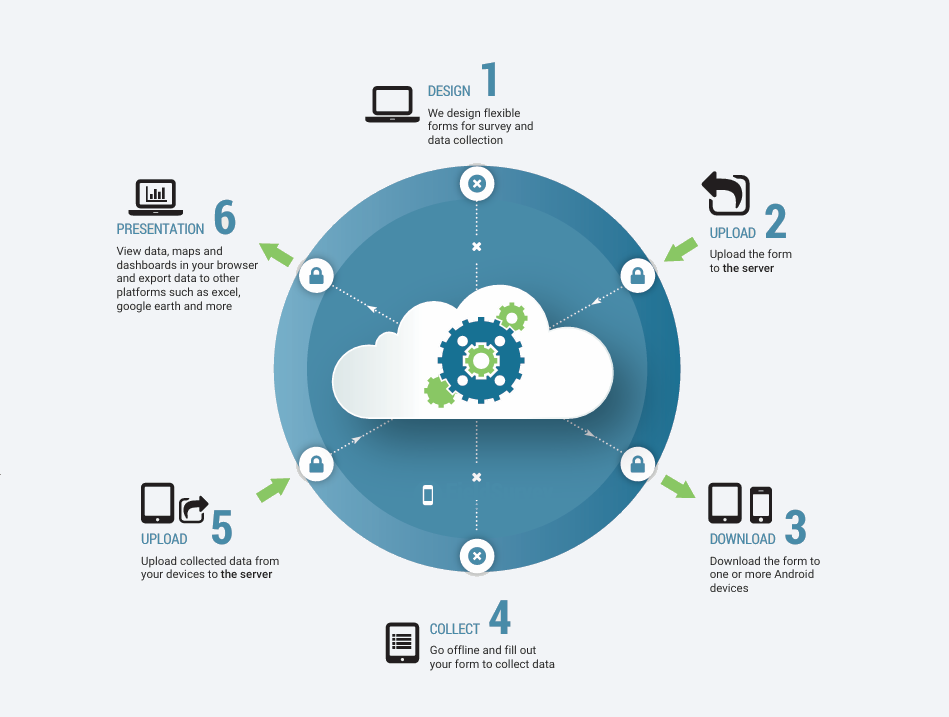
Any data that might be collected with paper and pen can be implemented in FieldSurvey, but there is much more that can be done with the inclusion of media, on the fly validation, and spatial elements.
- Collect data offline
The app allows for the data to be collected in areas where there is limited connectivity or where mobile data costs are high. Data is stored and transmitted when connectivity is available.
- Monitor survey progress
Any data collected areready to be validated as soon as they are submitted. This allows for changes to the survey to be identified and deployed, and for project managers to monitor the progress of the data collection process.
- Present and analyse
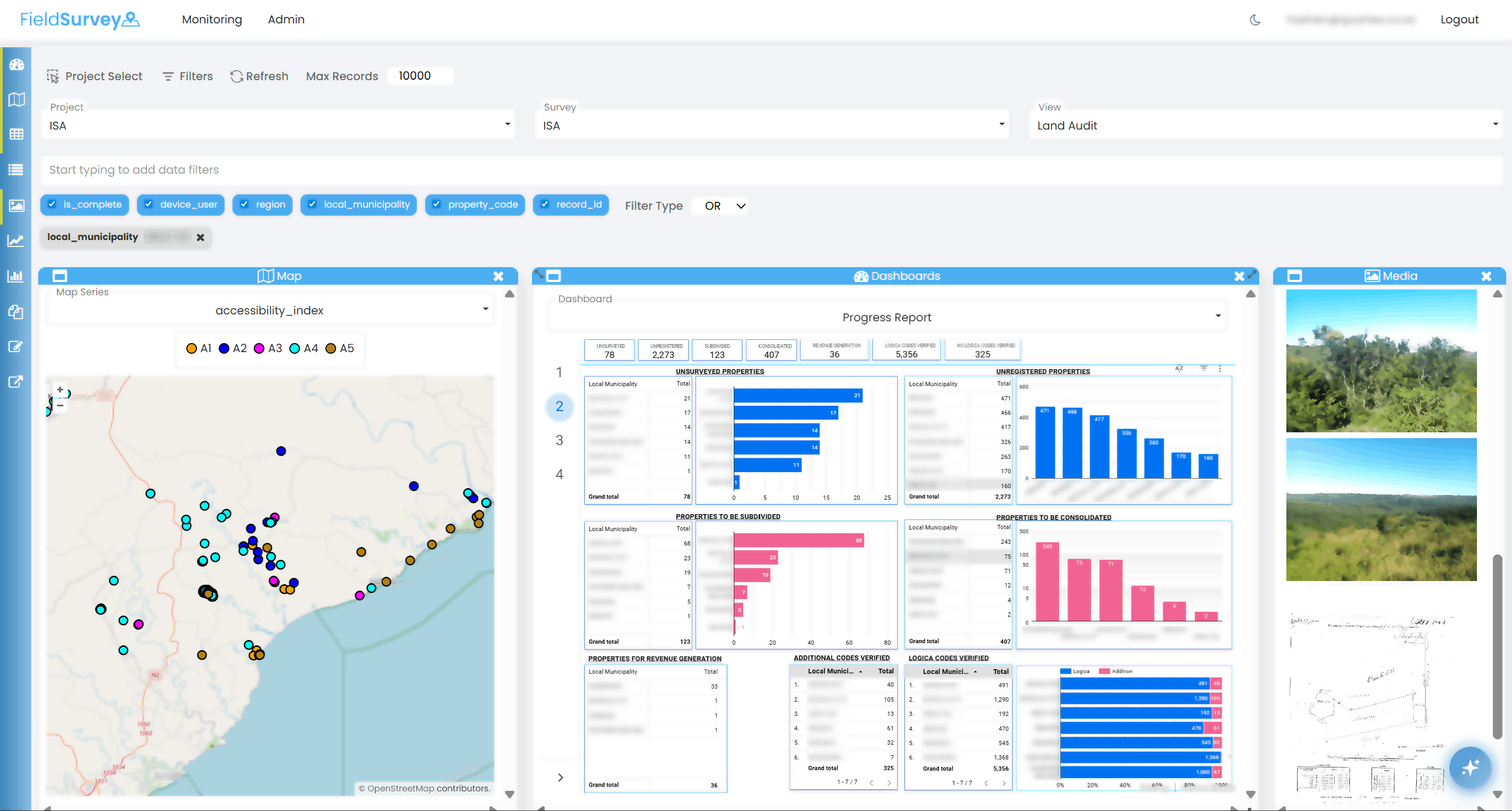
Within the presentation platform, survey results can be presented on an interactive map interface, in tabular format or in charts. Supporting documentation for the survey can be uploaded.
- Report and export
All data collected can be exported, along with any media, to be used in other applications. Additionally, reports can be generated, viewed and output in pdf, Word or other formats. Dashboards can be created and embedded.
- Ask the AI agent
The platform includes an AI agent, allowing natural language queries on the underlying data, producing tabular and chart output. The AI agent can also respond to prompts based on uploaded documentation.
How it Works
The Field Survey mobile application
Android app, based on Open Data Kit Collect with some extensions
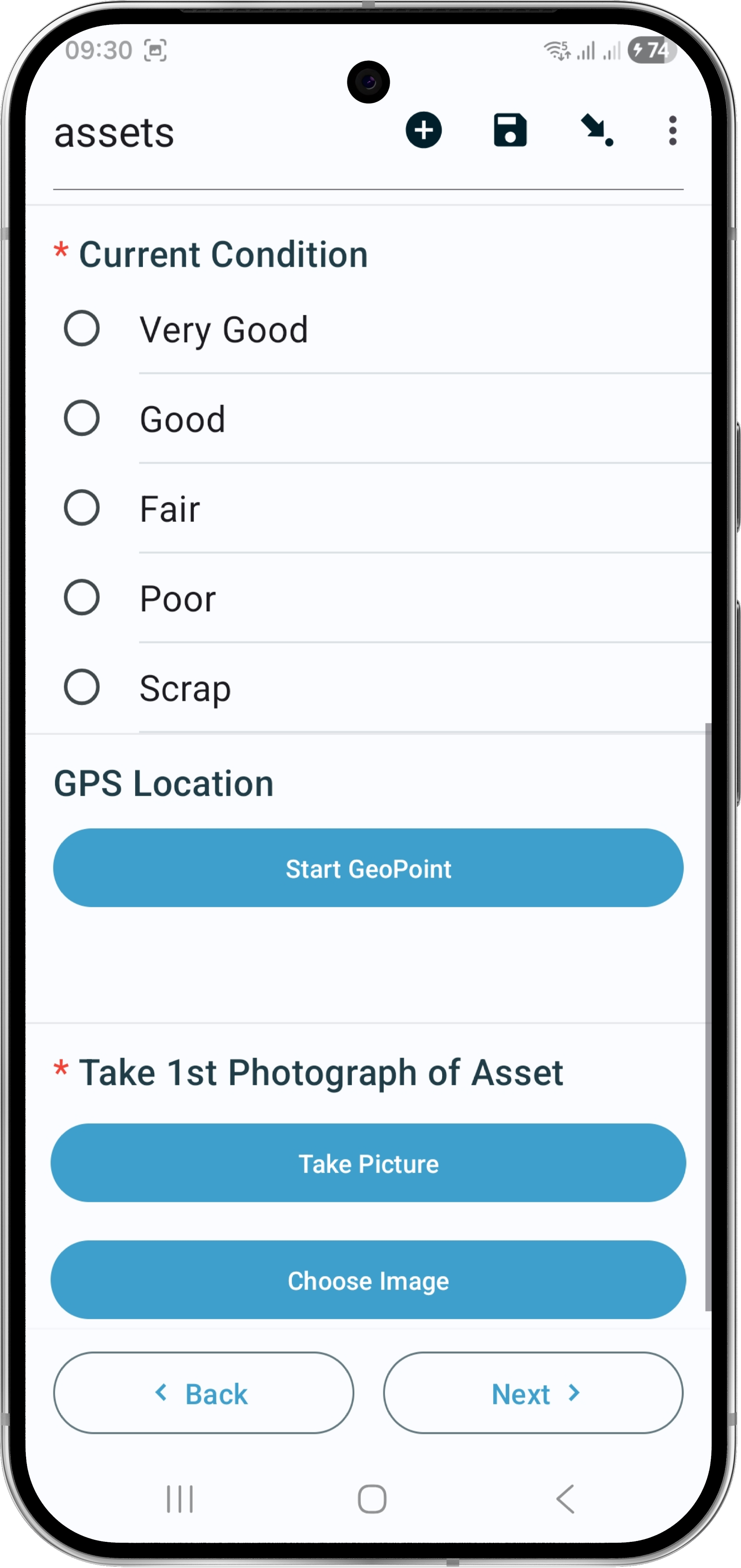
The app allows for the capture of data offline with a wide range of data and media types. Well defined surveys ensure data integrity, speed up data collection reduce costs, increase accuracy, and provide instant access to data through the presentation platform once the mobile devices are on line
Form Logic
Branching and skipping
Skip questions or move to a different part of the survey based on answers to other questions
Looping
Repeat groups of questions for multiple observations
Features
- Location accuracy
- User identification
- Answer validation
- Access data from csv for calculations and data integrity
- Hints and extended survey guidance
- Multi-language capabilities
Benefits
-
Capture and Upload
Near real time data capture and upload when connected
-
Offline Data
Collect data offline where connectivity is an issue
-
Quality Assurance
Enhanced Data integrity and quality
-
Media Linked
Media linked to observation and location
-
Efficiency and productivity
No costly transcription or transcription errors improving efficiency and productivity
-
Data collection progress
Monitor progress of data collection in near real time
-
Rapid upgrade
If requirements change, new survey version can be released quickly
Presentation platform
The web based platform enables the validation of captured information and presentation of data on maps, charts and tables. Dashboards provide snapshots of data collection progress and insights. Supporting documentation can also be included.
- Features
- Validate and edit data
- Monitor data collection progress
- View maps, charts and tables
- View and export RDLC reports
- Dashboard embedding
- Add supporting documentation
- Spatial Views
- Interactive map controls
- Show background layers
- Theme spatial data
- View media on map
- Display observation details
- Administration
- Control user access to functionality
- Control user access to data
- Flexible configuration
- Set up hierarchical filters
- Define charting parameters
- AI Enhancements
- RAG agent to query project documents
- RAG agent to query collected data
- Benefits
- All data collected accessible without recourse to spreadsheets
- Easily monitor data collection progress
- Design dashboards for additional analysis and insights as data is collected
- Build progress reports
Our Use cases
- Environmental Monitoring
Track climate changes in various locations.
- Health Surveys
Collect health data for epidemiological studies.
- Agricultural Research
Analyse crop conditions and farmer practices.
- Urban Planning
Survey residents for community development projects.
- Disaster Response
Record and assess impact areas post-disaster.
- Market Research
Gather consumer opinions and market trends.
- Wildlife Conservation
Monitor species and habitat conditions.
- Social Research
Understand community dynamics and social issues.
- Infrastructure Projects
Inspect and document construction progress.
Our Packages
Civil Engineering Construction
- Measurement of progress against the BoQ
- Monitoring of progress against method statements
- Daily site diary for reporting on:
- Weather conditions
- Personnel on site
- Plant on site
- Visitors to site
- Materials on site
- Accidents and incidents
- Written and verbal instructions
- Requests for information and approvals
- Register delays and potential claim